My Bash Setup
My Bash Setup
Though I primarily use the Emacs eshell, I do have bash as well setup.
My setup is like this:
Actual code
The actual code for setting this up is scattered across many repos, but the main entrypoint would be:
Repo staleness warnings
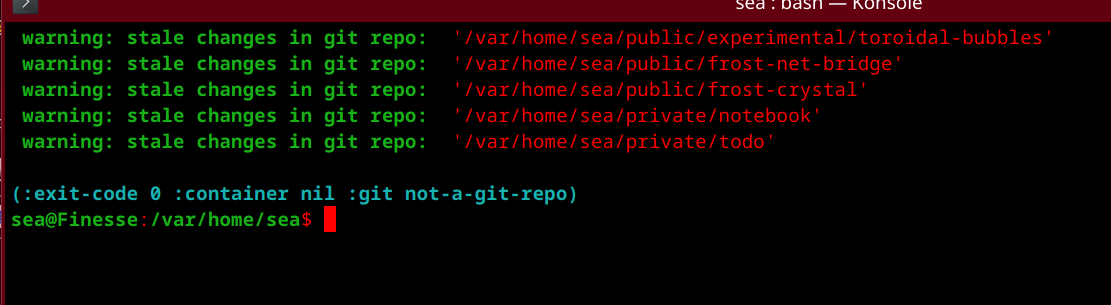
On startup, bash scans my `public` and `private` directories for stale git repos and prints them:
  # Upon starting up, print any stale repositories with a warning:
  frost.git.walk-directory-tree-and-find-stale-repos.sh "$HOME/public"
  frost.git.walk-directory-tree-and-find-stale-repos.sh "$HOME/private"
The relevant utilities are contained in:
Extended prompt
I've extended my prompt there with a little snippet that includes:
- Previous command exit code (so I don't need to `echo $?` to get at it)
- Whether or not I'm in a container (if I am, it will print the container name)
- Whether or not I'm in a git repo (if I am, it prints the repo name and the last commit comment)
Altogether these three are useful for knowing where I am when navigating my FS, and what the most recent change there was, and what context I might be in.
Bash Namespacing
To make better use of bash command completion, every utility and bash function that I make is namespaced.
For example, all of my utilities names begin with frost., and have further namespaces depending on what they do. That way, for example, to access any ceph-related commands I can type frost.ceph and hit tab.
I try to keep the naming clean and ordered, even if it means breaking exiting links in the process of cleaning things up. An elegant general theory is more important to me than the stability of my utilities, since I can always spend a few minutes fixing them again.